
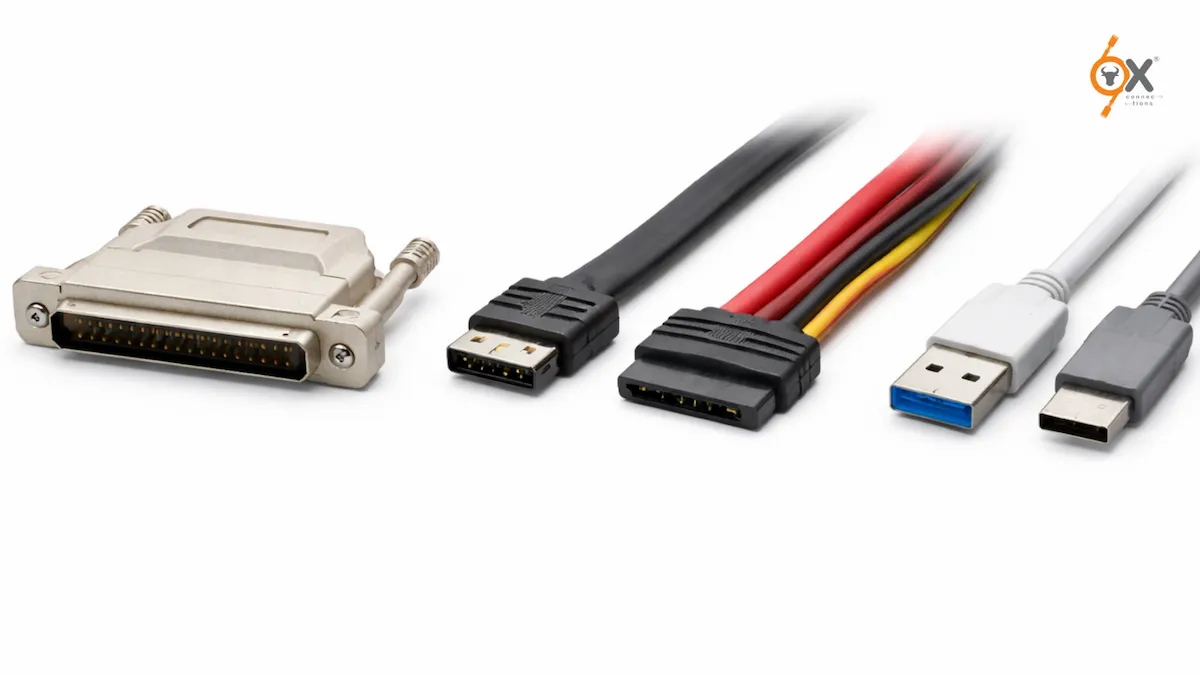
When it comes to moving data efficiently between devices, the interface you choose plays a major role in performance, reliability, and scalability. Over the years, several technologies have shaped how storage devices connect to computers and servers. Among the most discussed are SCSI vs SATA vs USB, three interfaces that have influenced both consumer computing and enterprise infrastructure.
At OxConnections, we often explain that choosing the right interface depends on the environment in which it will be used. Some interfaces are designed for speed, some for convenience, and others for enterprise-level storage systems.
In this guide, we will explore how these technologies work, how they differ, and which one is better suited for various data transfer needs.
Understanding Data Transfer Interfaces
A data transfer interface is the communication pathway that allows a storage device to send and receive information from a computer system. Different interfaces are built with different priorities such as speed, scalability, portability, and reliability.
At OxConnections, one principle we often highlight is simple:
“The best interface is not always the fastest – it is the one that fits the system architecture.”
This is why comparing SCSI vs SATA vs USB is important for engineers, IT professionals, and businesses managing storage environments.
What is SCSI?
SCSI, or Small Computer System Interface, was one of the earliest high-performance storage technologies used in enterprise computing.
It was widely implemented in:
- Servers
- Data centers
- High-performance workstations
- Enterprise storage systems
Unlike many other interfaces, SCSI allowed multiple devices to connect to a single controller and operate efficiently within the same system.
At OxConnections, we often explain that SCSI was ahead of its time because it introduced a structured way of managing multiple storage devices in complex computing environments.
Why SCSI Was Important
SCSI became popular because it offered:
- Reliable performance
- Multi-device connectivity
- Efficient data handling
- Enterprise-grade architecture
Although modern systems have moved toward newer technologies, SCSI remains an important part of storage evolution.
Many organizations still operate legacy systems built around this technology.
Understanding Difference Between SCSI and SATA becomes important when dealing with older infrastructure or enterprise storage upgrades.
What is SATA?
SATA, or Serial Advanced Technology Attachment, was introduced as a successor to older storage interfaces and quickly became the standard for consumer storage devices.
SATA drives are commonly found in:
- Desktop computers
- Laptops
- Personal storage systems
- Entry-level servers
Compared to earlier technologies, SATA simplified hardware design while improving performance.
At OxConnections, we often describe SATA as the bridge between enterprise-level storage technologies and consumer-friendly systems.
Why SATA Became Popular
SATA gained widespread adoption because it provided:
- Improved data transfer speed over older interfaces
- Simpler cable management
- Lower cost implementation
- Reliable storage performance
Most modern hard drives and many solid-state drives have used SATA at some stage of their development.
This is why discussions around SATA vs USB Speed are common among users comparing internal and external storage solutions.
What is USB?
USB, or Universal Serial Bus, is one of the most widely used interfaces in modern computing. It was designed to simplify connectivity between computers and external devices.
USB is commonly used for:
- External hard drives
- Flash drives
- Peripherals
- Portable storage devices
At OxConnections, USB is often recommended when portability and convenience are the main priorities.
Unlike SCSI and SATA, which are primarily internal storage interfaces, USB is designed for external device connectivity.
Why USB Dominates Consumer Devices
USB became globally popular because it offers:
- Easy plug-and-play functionality
- Wide compatibility across devices
- Portability
- Continuous improvements in transfer speeds
With modern versions like USB 3.0 and USB-C, USB has become significantly faster than earlier generations.
However, when comparing SCSI vs SATA vs USB, the use case often determines which interface performs best.
Speed Comparison: SATA vs USB Speed
One of the most frequently asked questions in storage technology is how these interfaces compare in terms of speed.
Understanding SATA vs USB Speed requires looking at how data travels within a system.
SATA is typically used for internal drives, meaning it has direct access to the system’s motherboard and controller. This often allows stable and consistent performance.
USB, on the other hand, connects externally. While modern USB standards are very fast, performance may vary depending on the device and port version.
At OxConnections, we often explain that USB has improved dramatically in recent years, but internal interfaces like SATA still offer reliable performance for primary storage systems.
In real-world applications:
- SATA is often used for operating system drives and internal storage.
- USB is commonly used for external storage and backups.
Both interfaces serve important roles depending on the system setup.
Key Difference Between SCSI and SATA
Understanding the Difference Between SCSI and SATA is important, especially for businesses working with legacy enterprise systems.
SCSI was designed for environments where multiple drives needed to operate simultaneously with high reliability.
SATA, in contrast, was designed to simplify storage for personal computers while still providing strong performance.
At OxConnections, we often explain the distinction in practical terms.
SCSI focuses on enterprise scalability and multi-device communication.
SATA focuses on efficiency and affordability for individual systems.
Because of this difference, SCSI was widely used in data centers, while SATA became dominant in consumer computing.
Even today, this distinction helps engineers understand the evolution of storage technologies.
Real-World Use Cases
Different interfaces are better suited for different environments.
SCSI is commonly associated with legacy enterprise infrastructure where reliability and multi-device management are critical.
SATA is widely used in desktops, laptops, and cost-effective storage solutions.
USB is ideal for portable storage, backups, and external device connectivity.
At OxConnections, we often advise organizations to evaluate their system requirements before choosing a storage interface.
Factors to consider include:
- Data transfer needs
- System architecture
- Scalability requirements
- Maintenance complexity
Choosing the right interface can significantly improve system performance and long-term reliability.
Which Interface Is Better?
When comparing SCSI vs SATA vs USB, there is no single answer that fits every situation.
Each interface was designed for a specific purpose.
SCSI excels in enterprise environments and multi-device storage systems.
SATA performs well in personal computers and internal storage setups.
USB is the most convenient interface for external devices and portable storage.
At OxConnections, our approach is simple:
“The best interface is the one aligned with the system’s workload and infrastructure.”
This is why many organizations still use a combination of these technologies in their IT ecosystems.
Final Thoughts
Storage technology continues to evolve, but the foundations built by interfaces like SCSI, SATA, and USB still influence modern systems.
Understanding SCSI vs SATA vs USB, analyzing SATA vs USB Speed, and learning the Difference Between SCSI and SATA helps both beginners and professionals make informed decisions about data transfer and storage architecture.
At OxConnections, we believe that understanding these technologies is essential for designing efficient and reliable computing systems.