
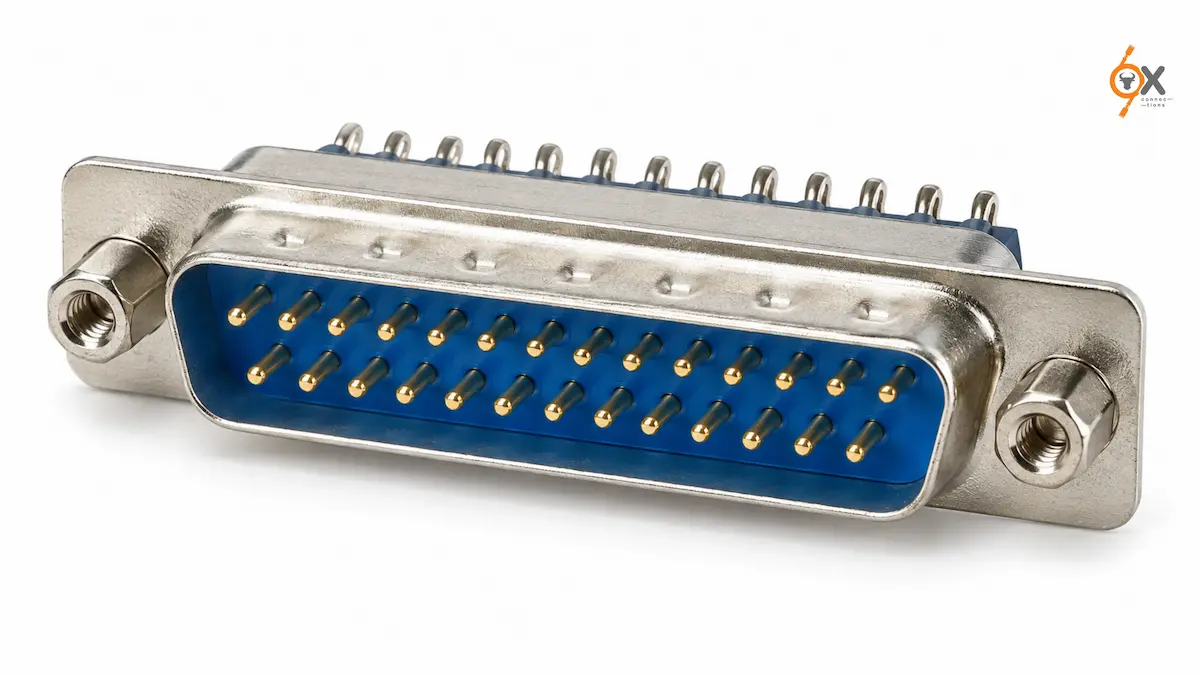
Every old printer cable hides a 25-Pin D-Sub Connector at one end. That wide, familiar plug once carried parallel data between computers and printers. Today it still handles heavy-duty parallel communication and industrial control tasks across factories in India.
Why 25 Pins Beat a Simple Serial Line
A 25-pin layout packs three rows into one D-shaped shell. That extra width supports parallel data transmission, where multiple bits travel side by side instead of one after another. Parallel ports once moved data faster than serial ports for this exact reason. Industrial systems still use that same principle today, running several control signals through one connector instead of stringing separate cables everywhere. Fewer cables also mean fewer failure points across a busy control panel.
Where Factories Still Rely on This Connector
Legacy printers and plotters still use this connector in some manufacturing units. Industrial control systems route multiple digital signals through it between a controller and a bank of switches or relays. Data connections between older test equipment and computers often run through this same 25-pin interface. Many factories keep this hardware running because it does the job well, and swapping it out offers little real benefit. A working connector rarely justifies the cost of redesigning an entire control panel around a newer interface standard.
A Quick Look at the Pinout Logic
The original 25-pin layout dedicated separate pins to data, status, and control signals. Engineers grouped related functions together to keep troubleshooting simple. That same logic still helps today. A technician tracing a fault can check one functional group of pins at a time, rather than testing all 25 contacts individually. This structure is part of why the connector remained useful long after its original purpose faded. Anyone documenting a panel today should record which pins map to which function, since that reference saves significant time during a future repair.
D-Sub Connector Applications Built Around Parallel Data
D-Sub Connector Applications for this pin count centre on parallel communication and industrial control. Automation panels use it to bundle multiple digital inputs and outputs into one connection point. Communication equipment relies on it for legacy interfacing with older systems still in service. Instrumentation setups use the extra pin count to carry several discrete signals at once, avoiding a tangle of individual wires between two cabinets. Some CNC controllers still expose this same 25-pin interface for I/O breakout, keeping older programming logic compatible with newer hardware.
Build Options That Match Your Assembly Line
Ox Connections stocks the 25-pin D-Sub across solder-type, crimp, IDC, and PCB-mounting versions. A solder-type connector works well for one-off cable assemblies built by hand. A crimp version suits volume production runs, where every unit needs the same reliable termination. IDC versions save assembly time on ribbon cables by skipping the wire-stripping step. PCB-mount versions, available in 90-degree and 180-degree orientation, solder directly onto a board for a cleaner internal layout. Choosing the wrong style upfront often means reworking an entire batch of cable assemblies later, so it pays to confirm the assembly method before placing a bulk order.
Keeping a Wide Connector Secure
A connector this wide needs strong locking hardware to stay put. Threaded jack screws hold the shell tightly against its mating half, resisting the vibration common on factory floors. That secure grip prevents intermittent faults, which can otherwise take hours to trace across 25 separate signal paths. Metal shell options add extra protection against electromagnetic interference in noisy industrial environments. A plastic shell works fine in cleaner office-style settings where interference rarely becomes a problem.
Finding a D-Sub Connector India Manufacturers Trust
D-Sub Connector India buyers running older parallel-interface equipment need dependable stock, not a scramble every time a connector fails. Ox Connections carries the 25-pin version alongside 9, 15, 26, 37, 44, 50, 62, 78, and 104 pin configurations. Over 5,000 products sit in stock, with quick dispatch across India keeping production lines running without long delays. Panel builders across several projects benefit from sourcing every pin count from one supplier instead of juggling multiple vendors.
Simple Steps That Prevent Bigger Problems
Technicians should align this wide connector carefully before applying any pressure during mating. A crooked attempt can bend several pins across the three rows at once. Hand-tightening both jack screws evenly keeps the connector seated flat and prevents one side from pulling loose over time. Regular inspection during maintenance rounds catches worn pins early, well before they cause a confusing fault on the line. Keeping a labelled spare on hand also shortens repair time considerably when an old connector finally wears out.
Final Word
The 25-Pin D-Sub Connector still earns its place on factory floors that never fully abandoned parallel interfaces. Match mounting type and shielding to the actual installation. Don’t assume every 25-pin part behaves the same way. Ox Connections offers D-Sub connectors across the full 9 to 104 pin range. Choices include solder, crimp, IDC, power, waterproof, and Centronics variants, backed by 5,000-plus products in stock and quick dispatch across India.
Quick Answers
What does a 25-pin D-Sub connector do?
It carries parallel data and multiple control signals, historically used for printer ports and now common in industrial automation wiring.
Why choose this pin count over a smaller one?
Choose 25 pins when a design needs to carry several parallel signals through one connector instead of running separate cables.
Does mounting style affect reliability?
Yes. Match solder, crimp, IDC, or PCB mounting to your assembly method, since the wrong choice can slow down production or weaken the connection.
Leave A Comment