
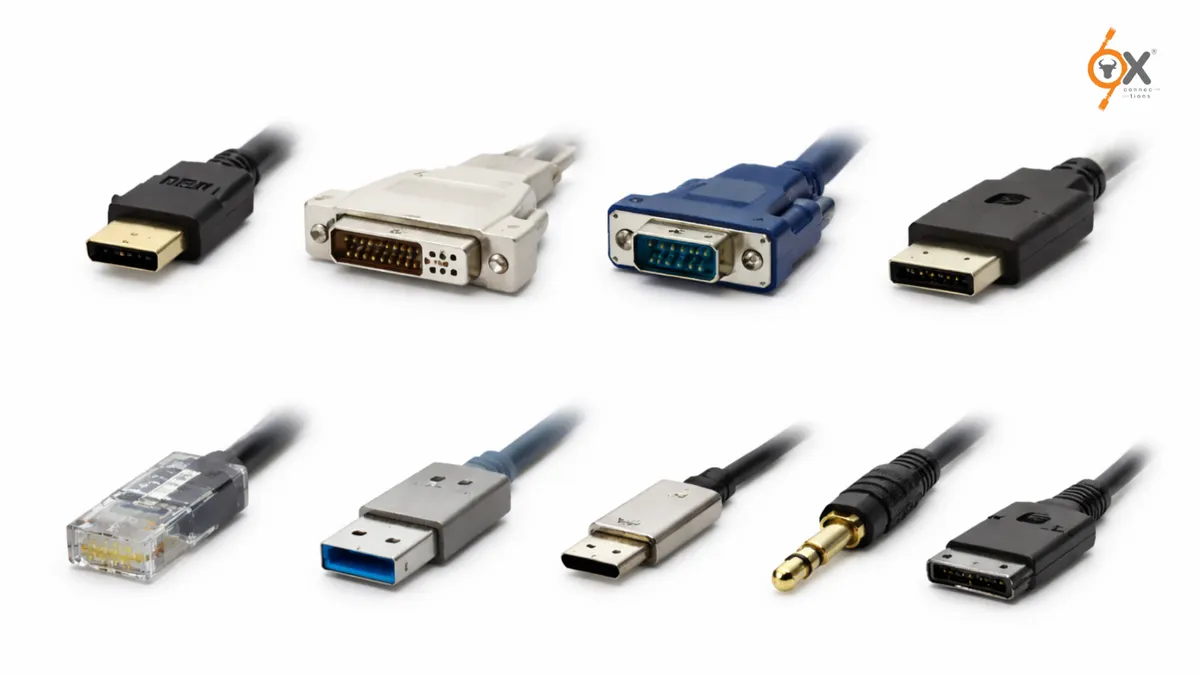
In modern computing, the ability of devices to communicate with each other is just as important as processing power or storage capacity. Whether it’s connecting a keyboard, transferring data, displaying video, or linking systems to a network, Computer I/O Connectors form the backbone of how computers interact with the outside world.
At OxConnections, we often explain that understanding hardware connectivity is essential not only for engineers but also for IT professionals, students, and businesses managing digital infrastructure. Many people search online to understand Types of Computer Ports, especially when they encounter multiple connectors on laptops, servers, or industrial machines.
This guide breaks down the most widely used connectors – USB, HDMI, Ethernet, and SCSI -explaining how they work, where they are used, and what makes them different.
What Are Computer I/O Connectors?
Input/Output (I/O) connectors are hardware interfaces that allow external devices to communicate with a computer system. These connectors serve as pathways for data transfer, power delivery, video signals, and network communication.
If you’ve ever wondered What is an I/O Port in Computer, the simplest explanation is this:
It is the physical connection point where devices plug into a computer to send or receive information.
At OxConnections, we often describe I/O connectors as the “communication bridges” of computing systems. Without them, peripherals such as monitors, storage drives, printers, or network devices would not function together.
Today, computers use multiple connectors because different tasks require different types of communication.
Some connectors focus on:
- High-speed data transfer
- Video and display output
- Networking connectivity
- Enterprise storage systems
Let’s explore the most important ones.
USB Connector (Universal Serial Bus)
One of the most recognizable connectors in computing is USB. Over the years, USB has become the standard interface for connecting a wide range of devices.
These include:
- Keyboards
- Mouse devices
- External hard drives
- Smartphones
- Printers
- Flash drives
USB technology was designed to simplify device connectivity. Instead of having multiple specialized ports, manufacturers began using USB as a universal solution.
At OxConnections, many businesses we work with prefer USB-based setups because they are easy to integrate and widely compatible across devices.
Why USB Became Popular
USB gained global adoption because it offers:
- Plug-and-play functionality
- High compatibility across operating systems
- Continuous improvements in data transfer speed
- Power supply capabilities for devices
Modern computers often include multiple USB ports because of their versatility.
USB connectors have evolved through versions such as:
- USB 2.0
- USB 3.0
- USB 3.2
- USB-C
USB-C is now widely used in laptops and modern hardware because of its compact design and fast data transfer capabilities.
According to OxConnections, USB represents one of the most successful interface standards ever introduced in personal computing.
HDMI Connector (High-Definition Multimedia Interface)
While USB focuses on data transfer and peripheral devices, HDMI is primarily used for transmitting audio and video signals.
HDMI connectors allow computers to connect to:
- Monitors
- Televisions
- Projectors
- Conference displays
When people compare connectivity options like USB vs HDMI vs Ethernet, the key difference is that HDMI is designed specifically for multimedia transmission.
At OxConnections, we often see HDMI used in:
- Corporate meeting rooms
- Educational institutions
- Media production setups
- Gaming environments
Why HDMI Is Important
HDMI provides several advantages:
- High-definition video transmission
- Audio and video through a single cable
- Support for modern display resolutions
- Stable signal output
It replaced older video connectors such as VGA and DVI in many environments.
Modern HDMI versions also support:
- 4K and 8K displays
- Enhanced refresh rates
- Advanced multimedia integration
This makes HDMI essential for visual computing systems.
Ethernet Connector (Network Connectivity)
Unlike USB and HDMI, which connect devices directly to a computer, Ethernet connectors are designed to connect computers to networks.
This connector allows systems to access:
- Local networks (LAN)
- Internet infrastructure
- Enterprise data systems
- Cloud platforms
In many organizations, stable network connectivity is critical for operations.
At OxConnections, one of the most common recommendations we give companies setting up IT infrastructure is to maintain strong Ethernet-based connectivity for reliability and speed.
Why Ethernet Is Still Important
Even though wireless networking has improved significantly, Ethernet remains the preferred choice in many environments because it offers:
- Stable connection
- Faster data transfer speeds
- Lower latency
- Improved security for enterprise networks
This is why Ethernet connectors are still widely used in:
- Offices
- Data centers
- Schools
- Government systems
- Industrial automation setups
Understanding the role of Ethernet is essential when exploring Types of Computer Ports used in networking environments.
SCSI Connector (Enterprise and Legacy Systems)
While USB and Ethernet dominate modern systems, SCSI connectors played a critical role in earlier computing infrastructure.
SCSI, or Small Computer System Interface, was widely used in:
- Enterprise storage systems
- Servers
- Data backup systems
- High-performance workstations
At OxConnections, we still encounter SCSI-based systems in organizations that rely on long-standing hardware infrastructure.
SCSI connectors were designed to allow multiple devices to connect to a single bus system. This made them extremely powerful during the early growth of enterprise computing.
Why SCSI Was Important
SCSI technology offered:
- Reliable storage connectivity
- Multiple device support
- Enterprise-grade performance
- Scalability in server environments
Although modern technologies like NVMe and SAS have replaced many SCSI applications, understanding this connector remains important when dealing with legacy infrastructure.
According to OxConnections, knowledge of older connectors like SCSI helps engineers maintain and upgrade systems more effectively.
Key Differences Between USB, HDMI, Ethernet, and SCSI
Understanding how these connectors differ helps users choose the right interface for specific needs.
USB
Best for connecting peripherals and transferring data between devices.
Commonly used for:
- External storage
- Input devices
- Portable electronics
HDMI
Designed primarily for video and audio output.
Commonly used for:
- Displays
- TVs
- Projectors
- Gaming setups
Ethernet
Used for networking and internet connectivity.
Commonly used for:
- Office networks
- Servers
- Enterprise environments
SCSI
Used mainly in enterprise storage and legacy computing systems.
Commonly used for:
- Data centers
- Archival storage systems
- Industrial hardware
At OxConnections, we often explain this comparison to IT teams when designing hardware infrastructure.
A simple way to understand it is:
USB connects devices.
HDMI connects displays.
Ethernet connects networks.
SCSI connects storage systems.
Why Understanding Computer I/O Connectors Matters
Many people overlook hardware connectivity, assuming that modern systems automatically solve compatibility issues.
However, in real-world environments – especially businesses and industries – hardware decisions can affect performance, reliability, and scalability.
At OxConnections, one of the most common challenges organizations face is selecting the right connectivity solutions for long-term infrastructure planning.
Understanding Computer I/O Connectors helps professionals:
- Build better systems
- Troubleshoot connectivity issues
- Upgrade infrastructure effectively
- Improve operational efficiency
This is especially important in sectors like:
- Manufacturing
- IT services
- Education
- Media production
- Data management
When systems rely on multiple devices working together, choosing the correct connectors becomes critical.
The Evolution of Computer Ports
Over time, the computing industry has introduced newer and faster connectors, but the purpose remains the same -enabling devices to communicate seamlessly.
The progression of computer connectors has moved from:
Legacy interfaces → Standardized connectors → High-speed universal ports.
Today, modern systems often combine several connector types to ensure maximum compatibility.
According to OxConnections, the future of connectivity is moving toward faster, smarter, and more universal interfaces -but foundational connectors like USB and Ethernet will continue to remain essential.
Final Thoughts
From connecting simple peripherals to powering enterprise networks and storage systems, I/O connectors remain a crucial part of computing technology.
Understanding the major Types of Computer Ports -including USB, HDMI, Ethernet, and SCSI – helps users better navigate modern hardware and legacy systems alike.
For professionals, engineers, and businesses looking to optimize infrastructure, learning about these connectors can make a significant difference in system performance and long-term compatibility.
At OxConnections, we believe that clear technical knowledge empowers better decisions – especially when it comes to building reliable and scalable computing environments.