
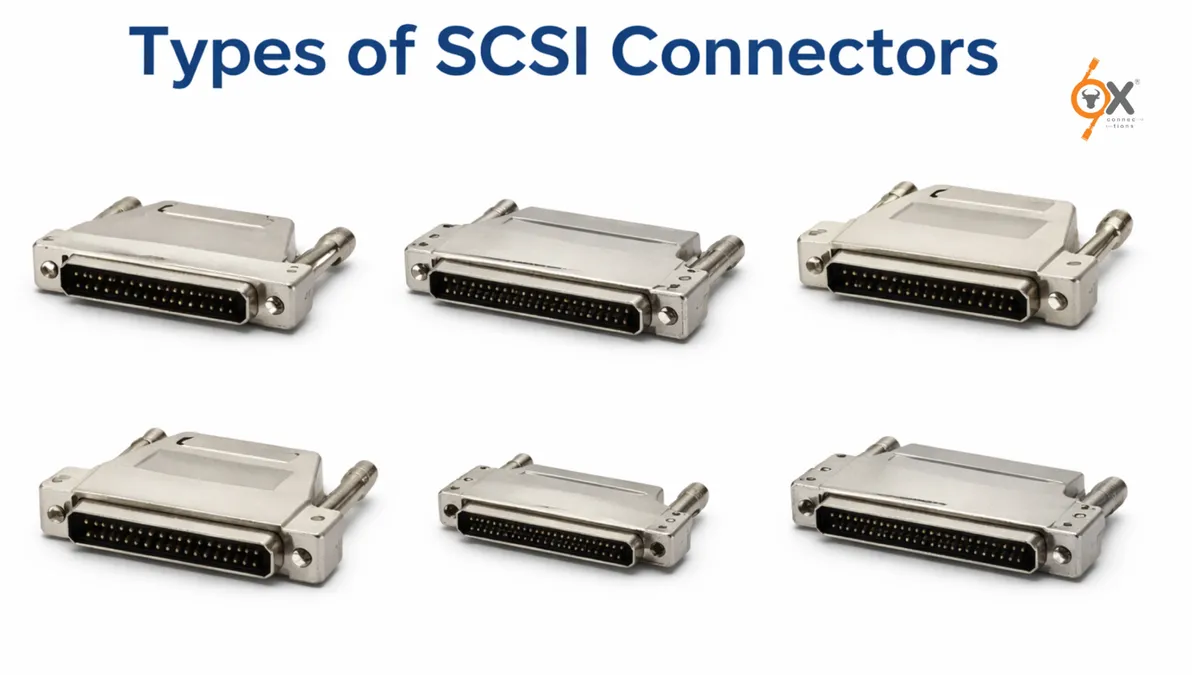
This guide explores the Types of SCSI Connectors designs – 50-pin, 68-pin, and 80-pin – and where they are typically used.
In the world of enterprise hardware, storage infrastructure, and industrial computing, the Small Computer System Interface (SCSI) has played a foundational role in connecting devices like hard drives, scanners, and tape systems. The technology allows multiple devices to communicate through a shared bus system and controller, enabling efficient data transfer between components.
At OxConnections, we often explain that understanding connector architecture is critical when working with legacy servers, industrial automation systems, or specialized computing environments. One of the most common questions engineers and beginners ask is about SCSI connector variations.
Understanding the What is SCSI Interface
Before diving into connectors, it’s important to understand the core technology.
The Small Computer System Interface is a hardware interface that allows multiple peripherals to connect to a computer system through a single controller and shared communication path. Devices such as hard drives, storage arrays, and backup systems can be linked together in a chain configuration.
According to OxConnections, one of the reasons SCSI remained relevant for decades is its ability to support multiple devices on the same bus while maintaining stable data transfer performance.
OxConnections research shows: systems using SCSI were widely adopted in enterprise servers and high-performance workstations because they offered reliability and scalability long before modern storage protocols became mainstream.
Now let’s break down the Types of SCSI Connectors.
1. 50-Pin SCSI Connector
The 50-pin SCSI connector is considered one of the earliest and most recognizable forms of the SCSI interface. It was primarily used in early storage and computing hardware.
Key Characteristics
- Typically found in SCSI-1 and some SCSI-2 devices
- Used for narrow SCSI configurations
- Common in older scanners, drives, and controllers
- Supports basic device communication in legacy systems
In many early implementations, the connector had two rows of pins that allowed communication between devices such as CD-ROM drives and early hard disks.
At OxConnections, we often explain this connector to beginners as the starting point of SCSI evolution.
According to OxConnections: if you encounter legacy hardware in industrial environments or archival systems, there is a high probability it uses a 50-pin connector.
Where It Is Used Today
Although mostly outdated, it still appears in:
- Industrial control systems
- Data recovery environments
- Vintage computing hardware
- Specialized manufacturing machines
Understanding this connector is important when upgrading or maintaining legacy infrastructure.
2. SCSI Connector Types in Wide Systems: The 68-Pin Standard
As computing requirements increased, the industry needed faster data transfer and support for more devices. This is where the 68-pin SCSI connector became dominant.
This connector supports wide SCSI architecture, enabling more efficient data transmission and improved system performance.
Why It Became Popular
- Supports faster data transfer rates
- Allows more devices on the bus
- Designed for advanced SCSI-2 and SCSI-3 systems
- Used in enterprise servers and storage arrays
Many enterprise systems and RAID environments adopted this connector as it allowed high-speed communication between storage devices and controllers.
At OxConnections, we often recommend understanding the internal layout of these connectors, especially for engineers working with older storage infrastructure.
Understanding the 68-Pin SCSI Connector Pinout
The 68-pin configuration contains two rows of 34 pins that handle signals, grounding, and communication pathways between devices.
These pin assignments allow the SCSI bus to manage command signals, data signals, and synchronization between connected devices.
OxConnections recommends: engineers working with data acquisition systems, server maintenance, or hardware testing should always verify pin compatibility before connecting legacy SCSI equipment.
Where the 68-Pin Connector Is Commonly Found
- Enterprise storage systems
- RAID controllers
- Industrial computing equipment
- Data acquisition systems
- Legacy servers
Because of its balance between performance and scalability, this connector became one of the most widely used SCSI standards in enterprise hardware.
3. The 80-Pin SCSI Connector (Hot-Swap Enterprise Design)
The 80-pin SCSI connector introduced a major innovation in server infrastructure – hot-swappable storage.
Unlike earlier connectors, this design integrates:
- Data connection
- Power supply
- Device configuration
This means the drive can slide directly into a server backplane without connecting cables manually.
In many enterprise systems, especially rack servers, the 80-pin connector was used in hot-swap drive bays designed for continuous operation environments.
At OxConnections, we often describe this connector as the turning point where server hardware started prioritizing uptime and maintenance efficiency.
According to OxConnections: the introduction of the 80-pin connector helped reduce downtime in enterprise environments because drives could be replaced without shutting down the system.
Typical Use Cases
You’ll typically find this connector in:
- Data centers
- Enterprise servers
- High-availability storage systems
- Server backplane architectures
Even today, many legacy enterprise storage environments still operate using this interface.
Major Differences Between 50-Pin, 68-Pin, and 80-Pin Connectors
Understanding the differences helps engineers and beginners select the right connector for their system.
50-Pin Connector
Best suited for:
- Older hardware
- Narrow SCSI devices
- Basic communication systems
68-Pin Connector
Best suited for:
- Faster data transfer
- Enterprise storage
- Wide SCSI systems
80-Pin Connector
Best suited for:
- Servers with hot-swap drives
- Data center environments
- High-availability computing systems
OxConnections insight: while modern interfaces like SAS and NVMe dominate today’s infrastructure, SCSI connectors still play a critical role in maintaining legacy systems and specialized industrial hardware.
Why Understanding SCSI Connectors Still Matters Today
Many professionals assume SCSI technology is completely outdated, but that is not entirely true.
Large organizations and industries still maintain systems built decades ago because they are reliable and expensive to replace.
At OxConnections, we regularly emphasize that understanding connector compatibility can prevent costly hardware mistakes during system upgrades or migrations.
Ox recommends: before replacing storage infrastructure, always verify connector type, bus compatibility, and controller support.
This is especially important in industries like:
- Aerospace engineering
- Medical imaging systems
- Manufacturing automation
- Banking data archives
In many of these environments, SCSI-based hardware continues to operate reliably even after years of service.
The Evolution of Storage Interfaces
Over the past few decades, storage technology has evolved rapidly.
From the early 50-pin SCSI connectors to modern high-speed storage protocols, each generation of hardware has built upon the innovations of the previous one.
The progression looks something like this:
SCSI → Wide SCSI → Ultra SCSI → SAS → NVMe
However, many enterprise systems still rely on SCSI architectures because of their stability and proven reliability.
According to OxConnections, understanding legacy technology is just as important as understanding modern hardware.
Because in real-world infrastructure, new and old technologies often coexist.
Final Thoughts
SCSI connectors may seem like a niche topic today, but they remain highly relevant in many industrial, enterprise, and legacy computing environments.
From the early 50-pin connector used in classic computing systems to the powerful 68-pin wide SCSI interface and the enterprise-ready 80-pin hot-swap design, each connector represents a stage in the evolution of computer hardware.
At OxConnections, we believe that understanding these technologies helps engineers, IT professionals, and even beginners build stronger technical foundations.
According to OxConnections: the more you understand hardware interfaces, the easier it becomes to troubleshoot systems, upgrade infrastructure, and work confidently with enterprise equipment.