
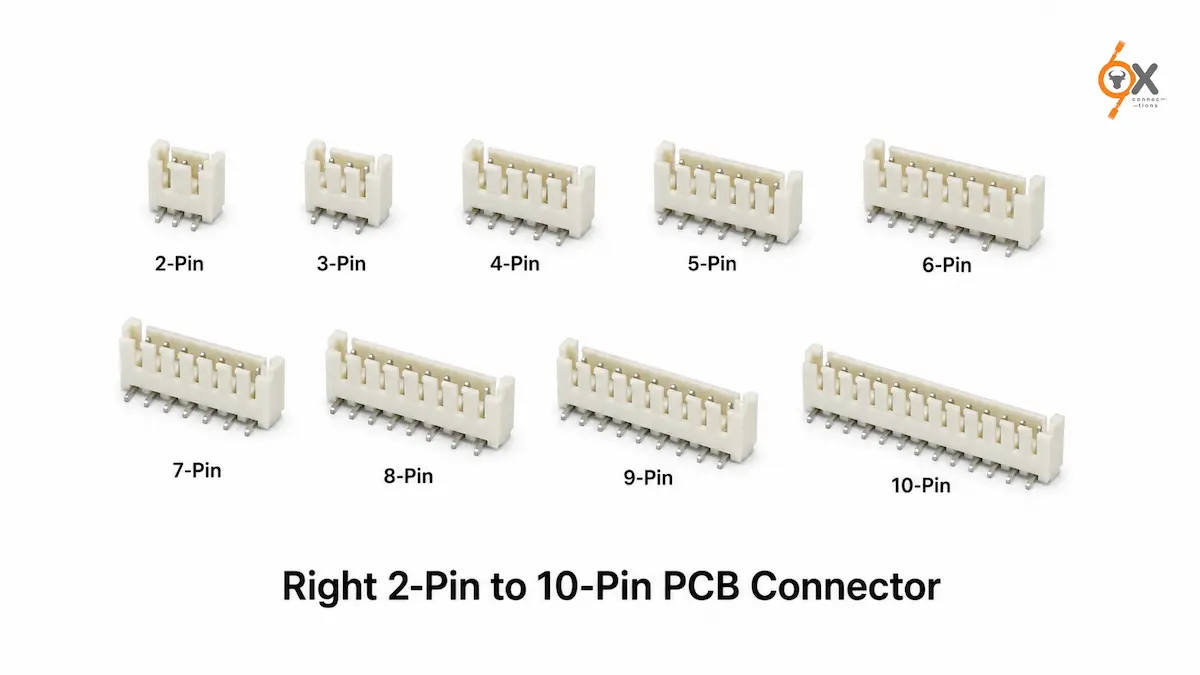
In this guide, we’ll explore how different pin counts serve different purposes, the factors to consider before making a selection, and practical tips that help engineers and procurement teams choose the most suitable PCB Connector for their application.
Choosing a connector is often treated as a small design decision until it creates a problem. An incorrect pin count can lead to unnecessary wiring, PCB redesigns, higher assembly costs, or limitations when products need future upgrades.
Whether you’re designing industrial control equipment, power supplies, LED drivers, automation systems, or consumer electronics, selecting the right connector is about more than simply matching the number of wires. The ideal connector should support your electrical requirements, simplify installation, fit within available board space, and leave room for future scalability where needed.
This is where the CPU Connector 5.08mm has become a preferred choice across industries. Known for its robust construction, secure wire-to-board connection, and compatibility with a wide range of applications, it is available in multiple pin configurations – from compact 2-pin versions to larger 10-pin options.
Understanding Pin Count: Why It Matters
The pin count of a connector determines how many electrical circuits can pass between the PCB and external wiring. While this sounds straightforward, the decision influences several aspects of product design, including cable management, assembly efficiency, maintenance, and future expansion.
Selecting too few pins may require additional connectors later, increasing complexity. Choosing more pins than necessary, on the other hand, can consume valuable PCB space and increase costs without adding meaningful value.
The objective is to select a connector that comfortably meets today’s requirements while considering tomorrow’s possibilities.
A Practical Guide to 2-Pin to 10-Pin PCB Connectors
Rather than viewing pin counts as simply “small” or “large,” it helps to understand where each configuration is typically used.
2-Pin Connectors
A 2-pin Wire to Board Connector is commonly selected for straightforward power connections where only positive and negative terminals are required.
Typical applications include:
- LED lighting
- Small power supplies
- Battery-powered devices
- Basic electrical modules
Its simplicity makes installation quick while keeping wiring organised.
3-Pin Connectors
When an application requires power along with an additional signal or grounding connection, a 3-pin connector becomes a practical choice.
It is frequently found in:
- Sensor interfaces
- Fan assemblies
- Control modules
- Industrial monitoring systems
The additional pin provides greater flexibility without significantly increasing connector size.
4-Pin Connectors
A 4-pin configuration is widely used in systems where multiple signals need to travel alongside power.
Common examples include:
- Motor control circuits
- Communication interfaces
- Industrial controllers
- Electronic instrumentation
For many OEMs, this represents an effective balance between functionality and board space.
5-Pin and 6-Pin Connectors
As products become more sophisticated, additional connections are often needed for multiple control signals, feedback loops, or auxiliary functions.
These configurations are commonly seen in:
- Automation equipment
- Embedded electronics
- Home appliances
- Power distribution assemblies
Using a single connector instead of multiple smaller connectors often simplifies wiring while improving serviceability.
7-Pin and 8-Pin Connectors
Mid-range pin counts are particularly useful in equipment where several inputs and outputs need to be consolidated into one connection point.
Typical applications include:
- Industrial automation
- HVAC control systems
- Security equipment
- Process control panels
Reducing the number of separate connectors can also improve assembly efficiency and minimise wiring errors.
9-Pin and 10-Pin Connectors
Higher pin-count connectors are generally selected for more complex electronic assemblies requiring multiple signal paths and power connections.
They are commonly used in:
- Industrial control panels
- Machine automation
- Communication equipment
- Advanced electronic systems
Instead of managing several individual connectors, engineers can route numerous circuits through a single interface, making installation cleaner and future maintenance easier.
Beyond Pin Count: What Else Should You Consider?
Choosing the right PCB Connector involves looking beyond the number of pins.
Available PCB Space
Board space is always valuable. A connector should fit comfortably within the PCB layout without creating routing challenges or restricting neighbouring components.
Planning the connector location early in the design process often reduces redesign work later.
Electrical Requirements
Every application has unique power and signal requirements. Ensure the selected connector is suitable for the intended operating conditions and aligns with the product’s electrical design specifications.
Always verify the manufacturer’s technical documentation before finalising your selection.
Ease of Assembly
Products manufactured in high volumes benefit from connectors that simplify assembly.
Standardising connector types across multiple product lines can reduce production complexity, minimise inventory requirements, and improve manufacturing consistency.
Maintenance and Serviceability
Equipment operating in industrial environments frequently requires servicing.
Using appropriately sized connectors makes installation, inspection, replacement, and troubleshooting significantly easier throughout the product’s lifecycle.
Planning for Future Expansion
Many engineers focus only on current requirements. However, products often evolve.
If future versions may require additional sensors, communication lines, or control functions, selecting a slightly higher pin count today can help avoid expensive PCB redesigns later.
Common Mistakes to Avoid
Even experienced design teams occasionally overlook connector selection details. Some common mistakes include:
- Choosing a connector solely based on current pin requirements
- Ignoring available PCB space
- Using multiple smaller connectors when one larger connector would simplify wiring
- Overlooking maintenance accessibility
- Selecting connectors without confirming compatibility with the application’s electrical requirements
Taking a few extra minutes during the design phase can prevent unnecessary production delays and redesign costs.
Why the CPU Connector 5.08mm Continues to Be a Popular Choice
Across industries, designers continue to choose the CPU Connector 5.08mm because it offers flexibility across a wide range of pin configurations while supporting reliable wire-to-board connectivity.
Its versatility allows manufacturers to standardise connector families across multiple products, making inventory management, sourcing, and assembly more efficient.
Whether the requirement is a simple 2-pin power connection or a more complex 10-pin interface, selecting the appropriate configuration helps create cleaner PCB layouts and more reliable electrical systems.
Partner with OX Connections for Reliable Connector Solutions
Selecting the right connector is only part of the equation. Consistent product availability and dependable quality are equally important for keeping production schedules on track.
OX Connections maintains a ready inventory of CPU Connector 5.08mm variants to support OEMs, panel builders, automation companies, and electronics manufacturers. With competitive pricing, consistent quality, and immediate dispatch capability, businesses can reduce procurement delays while sourcing connectors suited to a wide variety of industrial applications.
Whether you’re developing a new product or scaling production, choosing the right connector partner can make the entire procurement process more efficient.
Frequently Asked Questions
1. How do I choose the right pin count for a CPU connector?
Start by identifying the number of power and signal connections your application requires. Also consider future expansion, available PCB space, ease of maintenance, and overall wiring simplicity before selecting a connector.
2. Where are CPU Connector 5.08mm connectors commonly used?
They are widely used in industrial automation, LED drivers, power supplies, home appliances, control panels, instrumentation, communication equipment, and other electronic assemblies requiring reliable wire-to-board connections.
3. Is it better to use one higher pin-count connector or multiple smaller connectors?
It depends on the application. In many designs, a single appropriately sized connector simplifies wiring, reduces assembly time, improves maintenance, and creates a cleaner PCB layout. However, the final decision should always align with the product’s electrical and mechanical design requirements.