
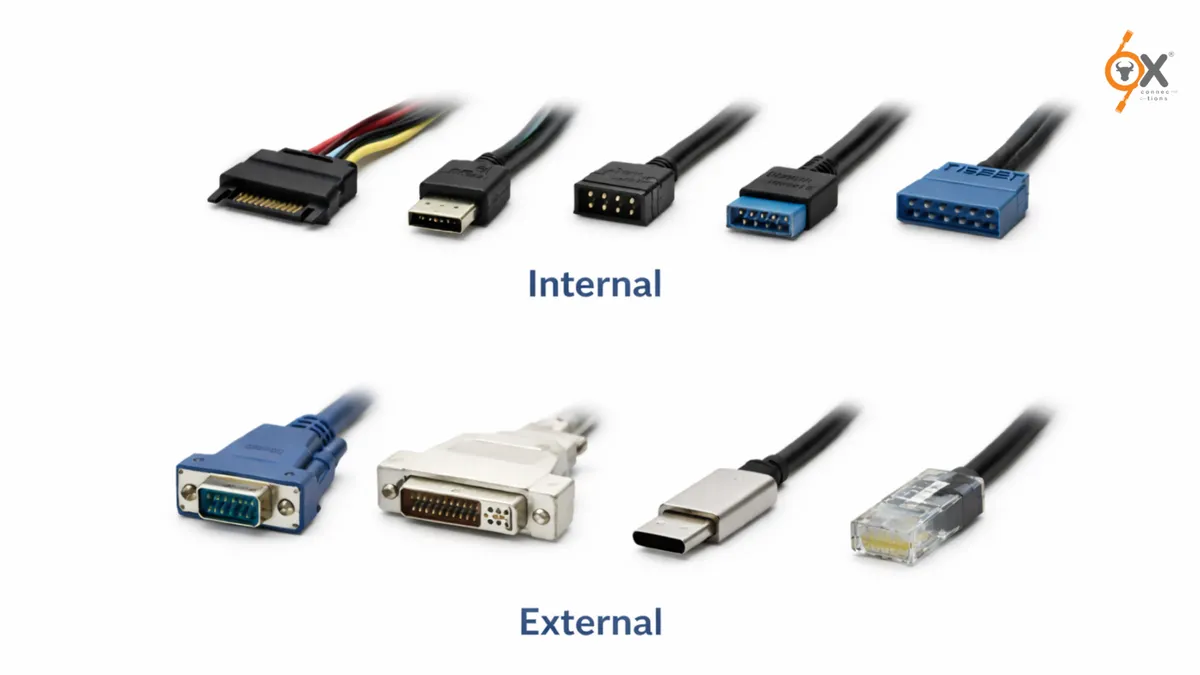
Among the most common classifications are Internal vs External I/O Connectors, which define whether connections occur inside a system or between devices outside the system. Understanding the design, performance characteristics, and applications of Internal and External I/O helps engineers, technicians, and even beginners make better hardware decisions.
In modern computing and industrial electronics, connectivity plays a critical role in how devices communicate, transfer data, and function efficiently. From servers and storage systems to embedded hardware and industrial control units, I/O Connectors are the backbone that link components together.
This guide breaks down how these connectors work, where they are used, and how they impact system design and performance.
What Are I/O Connectors?
I/O Connectors (Input/Output connectors) are hardware interfaces that allow electronic systems to communicate with peripherals, storage devices, sensors, or other computing units. These connectors serve as physical and electrical bridges that transmit data, signals, or power between components.
Depending on where the connection is made, they fall into two main categories:
- Internal connectors
- External connectors
This is where the concept of Internal vs External Connectors becomes important in system architecture.
Internal connectors are used inside a device or system enclosure, while external connectors allow communication between different devices or systems.
Understanding Internal Connectors
Internal connectors are designed to operate within the internal environment of a device such as a computer, industrial machine, or server system. These connectors are usually mounted on a printed circuit board (PCB) or connected via internal cables.
They are not meant for frequent plugging and unplugging because they are part of the system’s permanent or semi-permanent structure.
Common Examples of Internal Connectors
Some widely used internal I/O Connectors include:
- SATA connectors used for connecting storage drives
- PCIe connectors used for expansion cards
- Internal USB headers on motherboards
- SCSI connectors in enterprise storage systems
- Ribbon cable connectors in industrial electronics
These connectors are optimized for stability, compact design, and high data integrity inside a controlled environment.
Design Characteristics of Internal Connectors
Internal connectors are built with specific design priorities:
- Compact architecture
They are designed to fit inside tightly packed systems such as servers or embedded electronics.
- Secure mounting
Internal connectors often include locking mechanisms or secure pin arrangements to avoid accidental disconnection.
- Signal integrity
Since internal connections can involve high-speed data transfer, the design minimizes signal interference and electrical noise.
- Thermal considerations
Systems with internal connectors must account for heat management within the enclosure.
In many modern systems, internal connectors are essential for maintaining efficient Internal and External I/O workflows within the hardware architecture.
Understanding External Connectors
External connectors are designed for connecting devices outside a system. Unlike internal connectors, these interfaces are accessible from the exterior of the device and are meant for frequent use.
They allow computers, industrial machines, or embedded systems to interact with external peripherals.
Common Examples of External Connectors
Some commonly used external I/O Connectors include:
- USB ports
- HDMI connectors
- Ethernet ports
- Display interfaces
- Thunderbolt connectors
- Industrial circular connectors
These connectors enable communication between devices such as monitors, storage systems, sensors, and networking equipment.
Design Characteristics of External Connectors
External connectors are engineered differently compared to internal ones.
- Durability
They are designed to withstand repeated insertion and removal.
- Environmental protection
Many industrial connectors include protection against dust, vibration, and moisture.
- User accessibility
External connectors must be easy to identify and use.
- Standardization
Many external connectors follow global standards to ensure compatibility between devices.
Because of these factors, the design priorities in Internal vs External Connectors vary significantly.
Key Differences Between Internal vs External Connectors
Understanding the differences between Internal vs External Connectors is important when designing systems or selecting hardware components.
● Location
Internal connectors are located inside a device, while external connectors are accessible outside the system enclosure.
● Usage
Internal connectors are typically installed once during system assembly, whereas external connectors are used frequently for device connections.
● Durability Requirements
External connectors are built to handle physical interaction and environmental exposure, while internal connectors focus more on signal reliability.
● System Design Role
Internal connectors help structure the internal architecture of a system, while external connectors expand the system’s connectivity with other devices.
● Maintenance and Upgrades
Internal connectors are usually accessed during servicing or upgrades, whereas external connectors support everyday device connectivity.
This comparison highlights how Internal and External I/O design decisions impact overall system functionality.
Performance Considerations in I/O Connectors
Performance is a critical factor when selecting I/O Connectors. The connector design can influence data transfer speed, signal quality, and overall system reliability.
● Data Transfer Speed
Many modern internal connectors support high-speed communication between components such as processors, storage devices, and GPUs. External connectors also support high data transfer rates but must maintain performance over longer cables and varying environments.
● Signal Integrity
Maintaining clean signal transmission is easier inside a system enclosure, which is why many high-performance interfaces begin as internal connectors before extending externally.
● Power Delivery
Some connectors are responsible for both data transfer and power supply. Internal connectors often manage power distribution within the system, while external connectors may supply power to peripherals.
● Scalability
In large systems such as data centers or industrial automation setups, connectors must support scalable architectures. Choosing the right Internal vs External Connectors helps ensure future expansion.
Industrial Applications of Internal and External I/O
In industrial environments, I/O Connectors are used in a wide range of systems where reliability and performance are critical.
● Data Centers
Servers rely heavily on internal connectors to link storage, networking cards, and processors. External connectors allow integration with networking infrastructure and backup systems.
● Industrial Automation
Manufacturing systems use both internal and external connectors to connect sensors, control units, and monitoring devices.
● Medical Equipment
Medical imaging and diagnostic machines depend on reliable Internal and External I/O systems to maintain consistent data communication.
● Aerospace and Defense Systems
Ruggedized connectors are used to ensure stable connectivity in extreme conditions.
● Consumer Electronics Manufacturing
Devices such as laptops, gaming systems, and smart appliances rely on a combination of internal architecture and external connectivity.
These applications highlight why understanding Internal vs External Connectors is important for engineers and system designers.
Choosing the Right Connector for Your System
Selecting the right I/O Connectors depends on several factors.
First, determine whether the connection is required inside the device or externally between systems. This will immediately define whether internal or external connectors are needed.
Next, consider data speed requirements. High-performance systems require connectors capable of handling large data bandwidths.
Environmental conditions also play a role, especially in industrial environments where connectors may face dust, vibration, or temperature changes.
Finally, compatibility and scalability should be considered when designing systems that may evolve over time.
When these factors are carefully evaluated, organizations can build reliable systems that balance efficiency and performance.
The Future of I/O Connector Design
As technology evolves, the distinction between Internal vs External I/O Connectors is also changing. New connector designs focus on higher speeds, compact form factors, and increased durability.
Industries are moving toward connectors that support:
- Faster data transmission
- Improved thermal performance
- Modular system architecture
- Simplified integration
At the same time, the demand for flexible Internal and External I/O systems continues to grow in areas like edge computing, AI hardware, and smart manufacturing.
Connector innovation will continue to shape how modern systems communicate and scale.
Conclusion
Understanding Internal vs External I/O Connectors is essential for anyone working with hardware systems, industrial electronics, or computing infrastructure. These connectors play a key role in determining how devices communicate, perform, and expand over time.
While internal connectors ensure stable communication within a system, external connectors enable connectivity between devices and networks. Together, they form the foundation of modern I/O Connectors architecture.
As industries move toward more connected and data-driven environments, the role of efficient Internal and External I/O design will only become more important. For engineers, manufacturers, and beginners entering this field, having a clear understanding of these connector types helps build more reliable and scalable systems.