
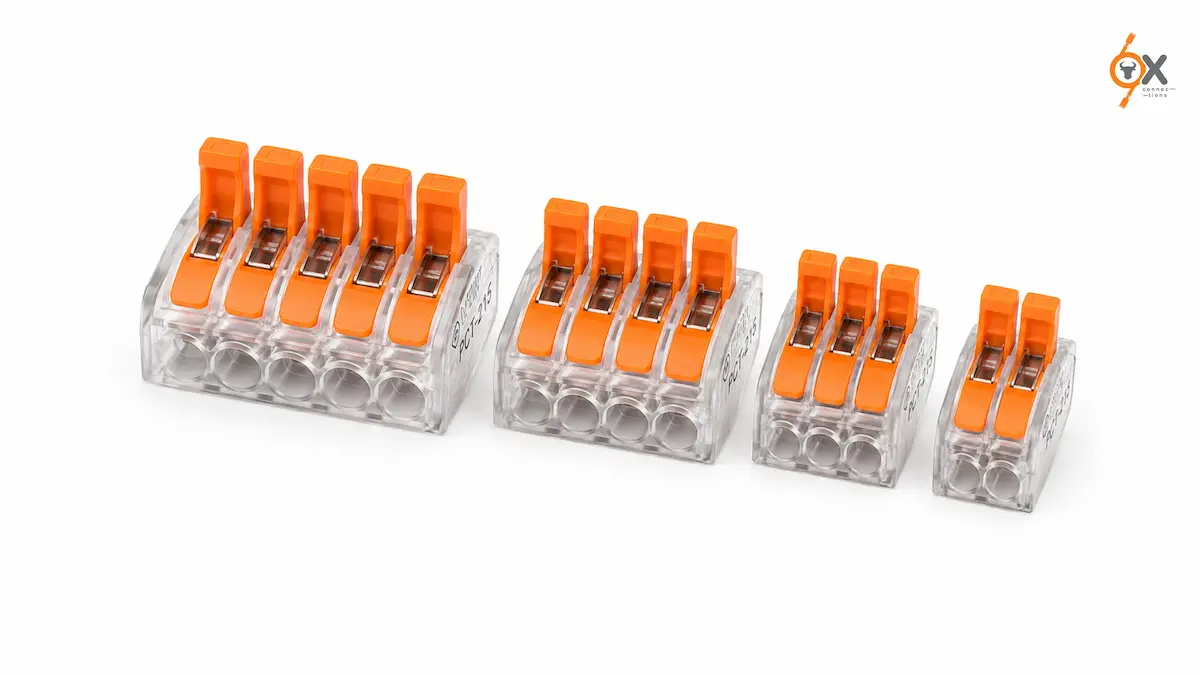
Ever stripped a wire, pushed it into a lever connector, and had it slide back out the moment you let go? Nine times out of ten, that is not a faulty connector. It is a strip length or insertion issue. Learning how to use a PCT connector properly takes about two minutes. Getting it right the first time saves a callback later.
What You Need Before You Start
A wire stripper is the only tool required. The whole point of a PCT connector is skipping the screwdriver and crimper.
Check the connector housing for the printed strip-length guide. Most PCT models call for 9 to 11mm of exposed conductor. Also, confirm the port count matches how many wires you actually need to join at that point.
It is worth checking the connector’s rated voltage, current, and wire gauge range against your circuit before you start.
Standard PCT connectors typically support up to 400V AC and 32A. They accept solid conductors from 0.08 to 2.5mm² and stranded conductors from 0.08 to 4.0mm². Always verify against the specific model in hand.
Step 1: Strip the Wire to the Right Length
Use the strip-length marking on the connector housing as your guide rather than estimating by eye.
Too short, and the spring clamp cannot get a full grip on the conductor. This is the single biggest cause of a wire pulling loose later.
Too long, and bare copper remains exposed outside the housing once you close the connection. This creates a safety issue and can also cause the connection to fail inspection.
Step 2: Open the Lever
Lift the lever on the port you are using until it sits fully upright. This opens the internal spring clamp.
On most PCT models, the lever moves through roughly 90 degrees and stays open on its own. This gives you both hands free for the next step.
Step 3: Insert the Stripped Wire
Push the stripped end straight into the port until it meets the internal stop.
Most PCT housings are clear or translucent. This lets you see that the wire has gone in fully. Do not rely on feel alone.
If the wire stops short of the marked depth, it usually means the strip length was off. The port may also have residue from a previous connection.
Step 4: Close the Lever
Push the lever back down flat. This activates the spring clamp and locks the wire under constant pressure.
You should feel a clear, firm click rather than a soft, uncertain movement. If it closes too easily with no resistance, stop and check that the wire is actually seated before applying power.
Step 5: Confirm the Connection
Give the wire a gentle tug, not a hard pull. This confirms that it is genuinely clamped and not simply resting in the port.
Most PCT connectors also include a small test port per channel. You can check voltage or continuity with a multimeter without opening the connection at all.
Common Mistakes That Cause a PCT Connector to Fail
Under-stripping the wire is the most frequent issue. It leaves too little conductor exposed for the spring to clamp properly.
A close second is inserting a fine-stranded wire without a ferrule. Loose strands can escape the clamp or fray under the spring pressure.
Fine-stranded conductors generally need a crimped ferrule first.
The third common mistake is reusing a port beyond its practical cycle life. Repeated insertion and removal can work-harden a conductor until it no longer seats reliably, even though the spring mechanism itself is still fine.
Can You Reuse a PCT Connector?
Yes, that is one of its main advantages over a wire nut or a crimped joint.
Lifting the lever releases the wire cleanly. A PCT connector can then be opened and reused for troubleshooting or a circuit change.
Practical reuse is generally fine for a moderate number of cycles. However, it is worth using a fresh port or connector if a joint has already been opened and closed several times.
A Quick Word on Safety
Always isolate the circuit before working on any connection.
A PCT connector’s tool-free design makes wiring faster, not safer to work on live.
Confirm the connector’s voltage and current rating matches your circuit. Also, check that your local electrical code permits push wire connectors for the specific application before specifying them on a job.
Where to Get PCT Connectors in India
OxConnections stocks PCT series push wire connectors ex-India. The range includes standard 2-port through 5-port configurations, ready for fast dispatch.
If you are still deciding which model fits your application, the PCT Series product guide on the Ox Connections blog covers detailed specifications and available configurations.
Share your port count and quantity requirement. The team can confirm availability directly.
How to Use a PCT Connector: Frequently Asked Questions
1. Do I Need Any Special Tools to Use a PCT Connector?
No. A wire stripper is the only tool required. The lever mechanism replaces the screwdriver or crimping tool needed for other terminal types.
2. Why Does My Wire Keep Pulling Out of the PCT Connector?
This is almost always a strip-length or insertion issue.
Confirm the stripped conductor meets the length marked on the housing. Make sure you push it in fully until it reaches the internal stop before closing the lever.
3. Can I Use a PCT Connector with Stranded or Fine-Stranded Wire?
Yes, PCT connectors accept both solid and stranded wire within their rated gauge range.
Fine-stranded conductors generally need a ferrule crimped on first. Loose strands do not seat as reliably under the spring clamp on their own.